

Node Js First Example: हम Console Based और Web Based Node Js Applications बना सकते हैं।
Node js First Example console-based
console.log('Hello Hindi Tutorials'); Node.js कमांड प्रॉम्प्ट खोलें और निम्न कोड चलाएँ:
node index.js
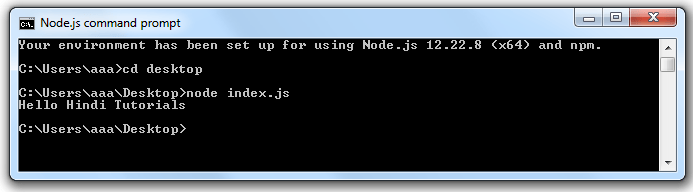
यहाँ, Console.log () फ़ंक्शन कंसोल पर संदेश प्रदर्शित करता है।
Node.js web-based Example:
एक Node.js वेब एप्लिकेशन में निम्नलिखित तीन भाग होते हैं:
Import required modules: “require” directive का यूज़ Node.js modules को Load करने के लिए किया जाता हैं।
Create server: आपको एक सर्वर स्थापित करना होगा जो अपाचे HTTP सर्वर के समान क्लाइंट के अनुरोध को सुनेगा।
Read request and return response: दूसरे चरण में बनाया गया सर्वर क्लाइंट द्वारा किए गए HTTP अनुरोध को पढ़ेगा जो एक ब्राउज़र या कंसोल हो सकता है और Response वापस करेगा।
How to create node.js web applications?
इन Steps का पालन करें:
Import required module: पहले स्टेप मैं हम “require” directive का यूज़ करके http Module को Load करेंगे और returned http instance को एक http variable में Store करेंगे।
var http = require("http");Create server: दूसरे स्टेप मैं, आपको बनाए गए http instance का उपयोग करना होगा और सर्वर बनाने के लिए http.createServer () विधि को कॉल करना होगा और फिर सर्वर से जुड़े listen Method का उपयोग करके इसे पोर्ट 8081 पर बाँधना होगा। Request और Response पैरामीटर के साथ इसे एक फ़ंक्शन पास करें और “Hello Hindi Tutorials” Print करने के लिए नमूना कार्यान्वयन लिखें। उदाहरण के लिए:
http.createServer(function (request, response) {
   // Send the HTTP header
   // HTTP Status: 200 : OK
   // Content Type: text/plain
   response.writeHead(200, {'Content-Type': 'text/plain'});
   // Send the response body as "Hello Hindi Tutorials"
   response.end('Hello Hindi Tutorials\n');
}).listen(8081);
// Console will print the message
console.log('Server running at http://127.0.0.1:8081/');Combine step1 and step2 together in a file named “index.js”.
var http = require("http");
http.createServer(function (request, response) {
 // Send the HTTP header
   // HTTP Status: 200 : OK
   // Content Type: text/plain
   response.writeHead(200, {'Content-Type': 'text/plain'});
   // Send the response body as "Hello Hindi Tutorials"
   response.end('Hello Hindi Tutorials\n');
}).listen(8081);
// Console will print the message
console.log('Server running at http://127.0.0.1:8081/');How to start your server:
स्टार्ट मेन्यू में जाएं और Node.js कमांड प्रॉम्प्ट पर क्लिक करें।
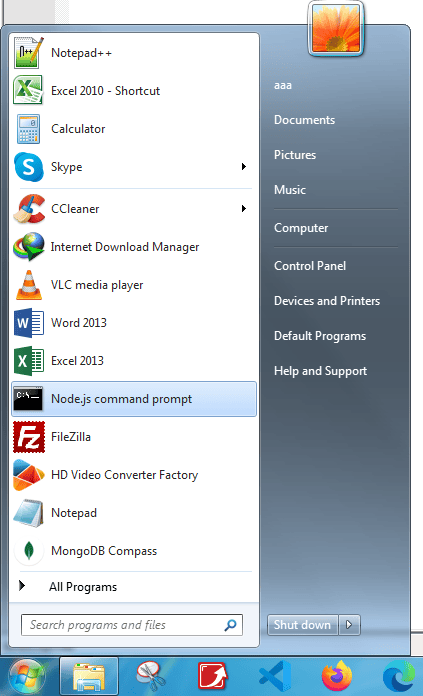
अब कमांड प्रॉम्प्ट खुला है:

Set path: यहां हमने “index.js” फाइल को डेस्कटॉप पर सेव किया है।
इसलिए कमांड प्रॉम्प्ट पर cd desktop टाइप करें। उसके बाद सर्वर को निम्नानुसार शुरू करने के लिए index.js निष्पादित करें:
node index.js

अब सर्वर शुरू हो गया है।
Make a request to Node.js server:
Open http://127.0.0.1:8081/ in any browser. You will see the following result.

अब, यदि आप “index.js” फ़ाइल में कोई परिवर्तन करते हैं, तो आपको फिर से “node main.js” कमांड चलाना होगा।

Welcome to HindiTutorials, your go-to platform for learning and mastering concepts in Hindi! Our mission is to make education accessible and simple for everyone by providing high-quality tutorials on programming, technology, and various other topics.