

How to install node js:
Node Js Install करने के लिए, आपको अपने कंप्यूटर पर निम्नलिखित दो सॉफ्टवेयर उपलब्ध होने चाहिए:
- Text Editor.
- Node.js Binary installable
Text Editor:
टेक्स्ट एडिटर (Text Editor) का उपयोग आपके प्रोग्राम को टाइप करने के लिए किया जाता है। उदाहरण के लिए: विंडोज में नोटपैड का उपयोग किया जाता है, vim या vi का उपयोग विंडोज के साथ-साथ लिनक्स या यूनिक्स पर भी किया जा सकता है। टेक्स्ट एडिटर का नाम और संस्करण ऑपरेटिंग सिस्टम में भिन्न हो सकते हैं।
टेक्स्ट एडिटर के साथ बनाई गई फाइलों को सोर्स फाइल कहा जाता है और इसमें प्रोग्राम सोर्स कोड होता है। Node.js प्रोग्राम के लिए स्रोत फ़ाइलों को आमतौर पर “.js” एक्सटेंशन के साथ सेव किया जाता है।
The Node.js Runtime:
Source File में लिखा गया Source कोड जावास्क्रिप्ट Language है। इसे Node.js Interpreter द्वारा Interpret और Execute किया जाता है।
How to download Node.js:
आप Node.js इंस्टॉल करने योग्य आर्काइव फ़ाइल का नवीनतम संस्करण लिंक https://nodejs.org/en/ डाउनलोड कर सकते हैं

Here, you deploy the installation of node-v18.12.1 LTS recommended for most users.

Accept the terms of license agreement.

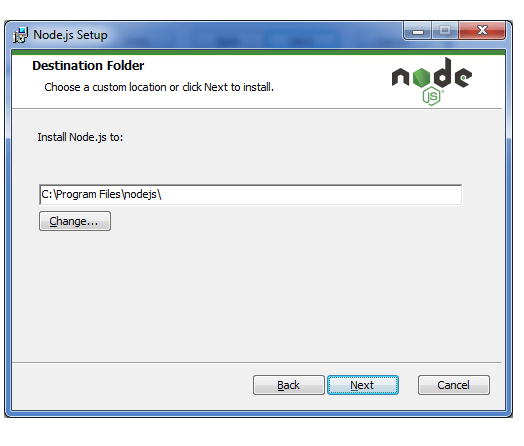
Choose the location where you want to install.


Welcome to HindiTutorials, your go-to platform for learning and mastering concepts in Hindi! Our mission is to make education accessible and simple for everyone by providing high-quality tutorials on programming, technology, and various other topics.